
SIEMs serve as central points for visibility across an organization’s security data. The concept behind a SIEM is simple: data goes in, security value comes out.
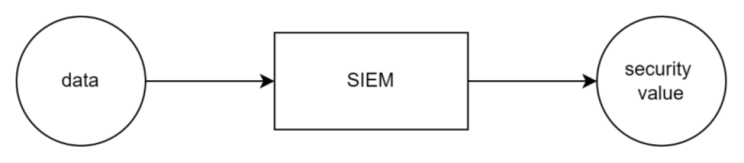
Still, many organizations are dissatisfied with how their SIEM operates. Over the years of working with these systems, I’ve often heard the same complaints: SIEMs are expensive, hard to navigate, noisy, and overall confusing.
In most cases, these issues stem from not knowing how to integrate SIEMs into existing security architectures or configure them correctly. Having been directly involved in nearly 40 SIEM deployments and migrations, I’ve seen (and made) just about every mistake imaginable and had a chance to help fix some of them.
In this article, I’ll walk through the top 3 SIEM deployment anti-patterns I’ve observed across those deployments, based on how common they are and how much they impact the overall experience of working with SIEMs.
1:1 Migrations
SIEM migrations are an interesting topic. When you think about it, a SIEM is probably the security tool that requires the most user input to get up and running. It sometimes makes you wonder whether a migration is really warranted. After all, how do you know it’s the tool that’s failing you and not your own approach?
Because SIEMs depend so much on a team’s skills, moving from SIEM A to SIEM B is a rare opportunity to apply all the lessons learned from the first deployment and modernize your organization’s threat detection strategy.
And yet, some organizations bring their old habits into the new environment.
I’ve worked with clients who decided to simply copy and paste their content from SIEM A into SIEM B. To me, that suggests they were fully satisfied with what SIEM A could do from a threat detection standpoint. But if that were true, why migrate at all?
Turns out, when I asked them this question, they weren’t actually satisfied with what their old SIEM could do. They just didn’t have a better plan than migrating one to one between the old and new solution.
And I get it. A 1:1 migration feels like the safest choice for everyone involved. You are not introducing change, so if something breaks, you will not be blamed for it.
But things did break.
First of all, a one to one migration means carrying over all the technical debt from the old SIEM into the new one. Every rule that didn’t work, every dashboard that showed nothing useful, all that alert fatigue, it all comes with you.
Then there is the issue of licensing and cost models, which often change drastically, especially when moving to a cloud SIEM. I have seen cases where an organization simply pointed their collectors to the new platform and called it a day. The result? A budget explosion. A migration is a perfect moment to trim unnecessary data, not just redirect it to the new solution.
Finally, the 1:1 approach often means you are not taking advantage of what the new SIEM offers. UEBA, SOAR integrations, built in detection content, threat intel feeds, all this value often gets ignored just to preserve the old setup in a new tool.
There are plenty of other issues with one to one migrations, but the biggest one is the missed opportunity to modernize. Take only what worked in your old SIEM, and use the migration to rethink your entire approach.
For instance, consider the framework I describe in this article:
Send everything, figure it out later
Did you notice how threat actors and SOCs are not so different? Both tend to collect data first and figure out what to do with it later. Threat actors wait for new ways to break encryption. What exactly do SOCs wait for when sending all their data into the SIEM?
Hard to say.

This is by far the most common anti-pattern I’ve seen. Sending data to the SIEM because it “makes sense” to do so.
‘What do you mean I shouldn’t send my network traffic logs to the SIEM?!’
Trying to talk stakeholders out from sending data to their SIEMs is difficult. I’d often hear ‘How are we going to see X without those logs?‘.
They are not wrong. It makes sense to send firewall, endpoint, and cloud logs to a SIEM. It might even seem logical to send everything in and alert on everything. That is, until we remember that SOCs operate under two key constraints: budget and throughput.
You can argue that SOC throughput can be solved by bringing more analysts in, so the constraints could be technically boiled down only to budget.
But both budget and SOC throughput are typically set to a certain threshold. While building out a SIEM we need to operate within that constraint. That’s why we need to prioritize.
Even if we didn’t have to prioritize, having more data often means that the specific events you’re looking for are buried deep in noise. After all, data collection does not automatically translate to visibility.
What typically happens to clients that choose to send more data than needed for security monitoring?

Roughly this.
I’ve met so many clients saying that cloud SIEMs with pricing built around ingestion volumes are simply too expensive. What more often is true is those clients tried a cloud SIEM without a clear approach, sent more data in that necessary and saw a cost they didn’t like.
Two solutions here:
- Identify which data is really needed before sending anyting to the SIEM (see my approach above)
- Organize data into appropriate storage tiers. Most modern SIEMs allow cost-effective storage options that balance accessibility with budget constraints. Here’s how you can approach this:

Early focus on Crown Jewels
Monitoring of organization’s most important systems is a no brainer. Visibiliy of security threats impacting your critical assets is one of the main reasons you have a SIEM in the first place. So what’s the problem?
By the time a threat actor reaches a Crown Jewel, it’s typically late in the attack chain. By focusing on monitoring of the most cirtical assets first, we decrease our ability to detect and subsequently stop the attack at the earlier stages.
I once worked with a healthcare data broker that spent six months onboarding all their databases and related systems into their SIEM. They were prepared, done thorough threat modeling and wrote custom detection rules from scratch specifically for their unique use-case.
Then they were hit by a simple phishing which they were completely blind to. The data they worked so hard to protect was eventually exfiltrated, not from a database, but from the workstation of one of their frontline employees.
This is precisely why I always preach focusing on basics first and then, after everything else is accounted for, moving to Crown Jewels. I start with the low-hanging fruit such as alerts from existing security tools, then move to broad, threat intelligence-based custom detections, and only after that, build monitoring for the most critical assets:
Sometimes success is not about doing everything right, but about avoiding the mistakes that can derail you. SIEM onboardings are a good example. Even if you do not yet have a clear strategy in place, you can make solid progress by focusing on what not to do. In this article I described what I believe are the most common anti-patterns in SIEM deployments.
Each of these anti-patterns leads to inefficiency, higher costs, and missed detection opportunities. Fortunately, many of these issues can be fixed – some more easily than others. For example, refocusing efforts away from early crown jewel monitoring is relatively simple, while correcting a 1:1 migration can be far more challenging.
My hope is that readers recognize these patterns within their own SIEM deployments and work towards fixing them.
Follow the blog on Linkedin: https://www.linkedin.com/company/secops-at-home/


 SecOps at home
Leave a comment